
Show it once. It does it forever.
Do It Once is a Chrome extension for the boring jobs you repeat on the web — downloading the monthly invoice, exporting the same report, filling the same form. Record yourself doing the chore once, and it replays your exact steps, locally, for free. No AI tokens. Nothing leaves your browser.
Free for 3 chores, with unlimited replays — and one chore can run on a schedule. No account, no sign-up.
How it works
Record it once
Press Record and do the chore the way you always do it — clicks, typing, downloads. Do It Once watches and remembers every step. Passwords and card fields are never recorded.
Press play — or schedule it
Next time, press Play and it does the whole chore for you. Or set a schedule — daily, weekly, monthly — and it runs on its own, then leaves you a plain-English log of what it did.
It heals itself — and asks when it should
If a site moves a button, it finds the new spot, with one click from you if it's unsure. And it always stops to ask before anything that matters: a password, a payment, a final Submit.
What it does
Five ways to find every button
Every step is remembered five different ways — by its permanent markers, its label, its visible text, its place on the page. When a site redesigns and one way breaks, the others carry it. That's why replays survive the small changes that break ordinary macros.
Variables that change each run
Type a date or an invoice number while recording, and Do It Once asks: does this change each time? Choose “last month”, “today”, or “ask me each run” — no code, no formulas, just a tap.
Schedules
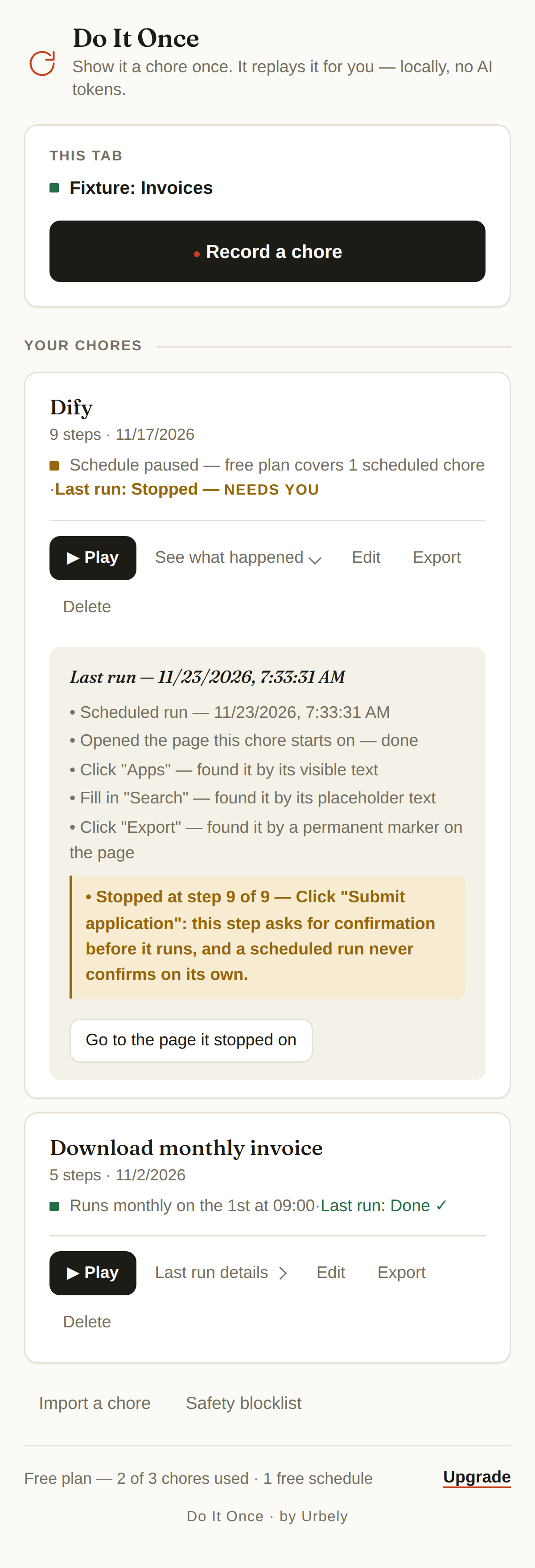
Daily, weekly, or monthly, at the time you pick. A scheduled run opens the page itself, does the chore, closes up, and writes down what happened. If it reaches a step that needs you, it stops there and tells you exactly where.
Safety pauses
It never types a password, code, or card number — those steps pause for you, every time. It never confirms a payment or a final submission on a scheduled run. Banking sites are blocked outright.
100% local
Your chores live in your browser's own storage, on your machine. There is no Do It Once server, no account, and no telemetry — we couldn't see your browsing if we wanted to. Export your chores as a file any time; they're yours.
Download renaming
Downloads a chore produces can be renamed as they land — Stripe_2026-11_invoice.pdf instead of download (3).pdf — using a simple pattern you set once per chore.
A fair question
Why not just use an AI browser agent?
An AI agent re-thinks your chore from scratch on every run — and charges you tokens for the thinking, every single time. It can still wander off, misread a page, or click the wrong thing, and the same chore costs you money forever.
A recorded chore doesn't think. It repeats. Your exact clicks, in your exact order, verified against the page five ways — for $0 per run, as many times as you like. Use the agent for new problems. Use Do It Once for the ones you've already solved.
Questions
What data leaves my browser?
None of your browsing data — ever. Your chores, settings, and run logs are stored only in Chrome's local storage on your device. There is no analytics, no telemetry, no tracking. The one exception: if you buy Pro and enter a license key, the extension checks that key with Polar, our payment provider — it sends the key and nothing else. Full details are in the privacy policy.
What happens when a website changes its layout?
Usually, nothing — each step is remembered five ways, so a moved or renamed button is still found. If a change is too big, replay pauses and asks you to click the right element once. It learns the new spot, and the chore is fixed from then on.
Do scheduled runs work when Chrome is closed?
No — and we won't pretend otherwise. Schedules run inside Chrome, so Chrome needs to be open at the scheduled time. If it isn't, the run happens when you next open Chrome, and the log shows the actual time it ran.
Which sites does it work on?
Any normal website you use in Chrome — dashboards, admin panels, billing pages, reports. Two limits: banking and financial sites are blocked for safety, and it can't type passwords or confirm payments for you — those steps always pause for you, by design.
What if it stops mid-chore?
It stops rather than guesses, and tells you why in plain English — open “See what happened” next to the chore to read the step-by-step log and jump to the page where it stopped. Nothing is ever left half-submitted without you knowing.
How do refunds work?
Payments are handled by Polar, our merchant of record. If Pro isn't for you, contact us at urbelyai@gmail.com within 30 days of purchase and we'll arrange a refund through Polar — no forms, no retention script.